
Understanding Laptop Form Factors: Ultrabooks, 2-in-1s, Gaming Laptops, and More
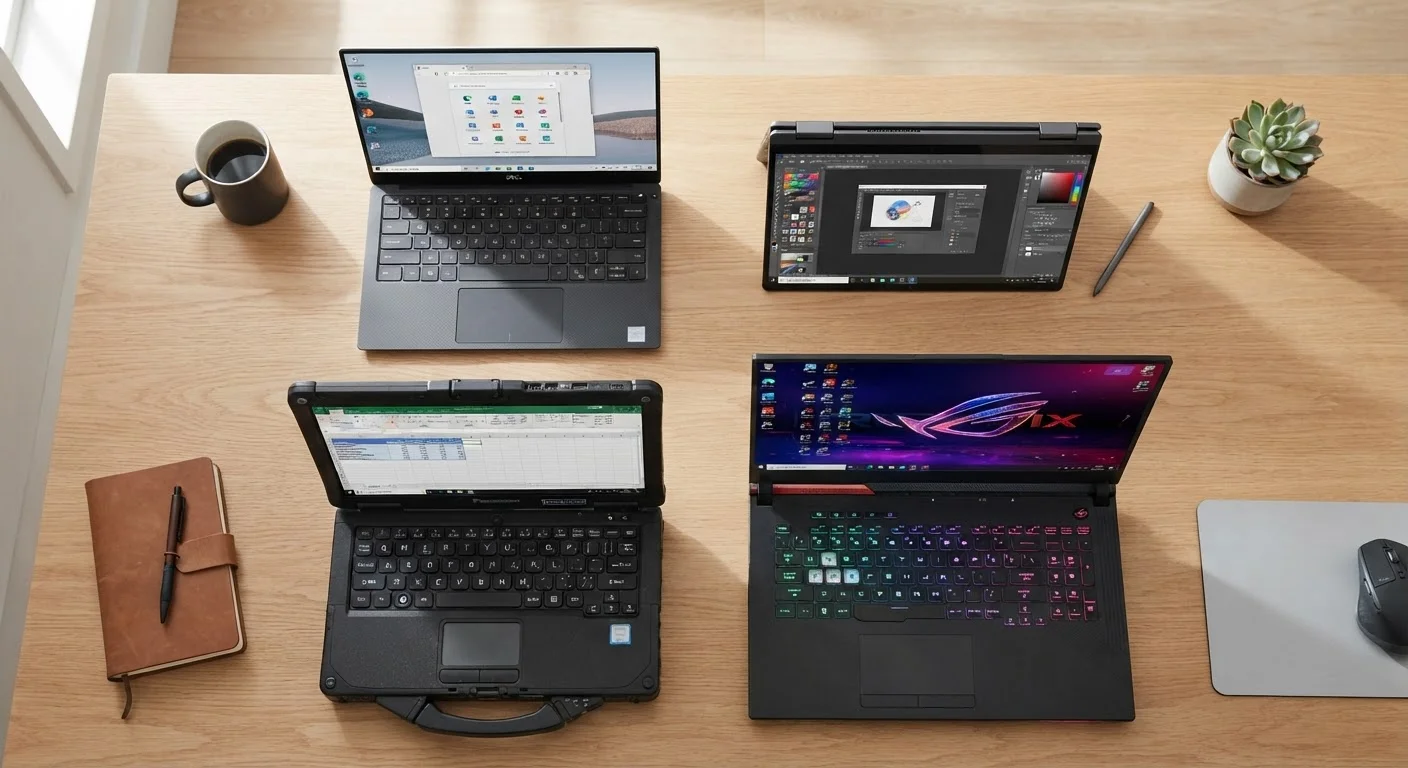
Photo credit: TheBlogZappier.com | Simple Search, Credible Results
In this article
What separates an ultrabook from a standard laptop? This guide breaks down every major laptop category and who each suits best.
Key Takeaways
- Ultrabooks prioritize thinness and battery life over raw processing muscle.
- 2-in-1 laptops combine a touchscreen with a convertible or detachable design, adding versatility at some cost to performance.
- Gaming laptops pack powerful GPUs and CPUs into portable chassis but trade battery life and portability for that power.
- Chromebooks run Google's ChromeOS and suit users whose work lives mostly in a web browser.
- Matching form factor to your daily tasks is more useful than chasing the highest specs.
Why Form Factor Matters Before Specs
When most people shop for a laptop, they jump straight to specs: how much RAM, what processor, how much storage. But form factor — the physical shape and design philosophy of the device — often shapes your experience more than any single number on a spec sheet.
A thin ultrabook and a thick gaming laptop might share the same processor generation, but they behave completely differently under a sustained workload because of how each is cooled, how big the battery is, and how the chassis manages heat. Understanding what category a laptop belongs to tells you the trade-offs a manufacturer chose to make — before you spend a dollar.
For a broader foundation on hardware basics, see our complete guide for first-time laptop buyers.
~3 lbs
Typical ultrabook weight
Most ultrabooks target a sub-3-pound design goal, compared to 4.5–7 lbs for gaming laptops of comparable screen size.
10+ hrs
Claimed battery life, ultrabooks
Many ultrabooks advertise 10–15 hours of battery life under light use, though real-world figures vary with brightness and workload.
360°
Hinge rotation on convertible 2-in-1s
Convertible 2-in-1 laptops use a full-rotation hinge to switch between laptop, tent, stand, and tablet modes.
Ultrabooks: Thin, Light, and Battery-Focused
The term ultrabook originated as a marketing category but has come to describe any thin-and-light laptop built around portability and all-day battery life. They typically weigh under 3 pounds, measure less than 0.7 inches thick, and prioritize fast resume-from-sleep and long runtime over peak performance.
The trade-off is thermal headroom. Because the chassis is slim, there's limited space for cooling. Ultrabooks handle office work, web browsing, and video calls without issue, but they can throttle — meaning the processor slows itself down to avoid overheating — during sustained tasks like video rendering or running complex models. If you work mostly in a browser, documents, or communication tools, that throttling likely won't affect you.
Check Sustained Performance, Not Peak Numbers
Manufacturers often advertise peak processor speeds that are only maintained for short bursts. For ultrabooks especially, look for independent reviews that test sustained workloads — like a 30-minute video export — to see if the chip throttles over time. A slightly lower-spec machine with better thermal design may outperform a higher-spec one in real use.
2-in-1s: Convertible and Detachable Designs
A 2-in-1 laptop is a device that functions as both a laptop and a tablet. Two designs dominate the category. Convertible models have a hinge that rotates the screen a full 360 degrees, letting you use the device flat as a tablet or propped in tent or stand mode. Detachable models have a screen that separates entirely from a keyboard base.
The main appeal is flexibility — particularly useful for students taking handwritten notes with a stylus, or professionals who want a device that doubles as a presentation tool. Performance tends to be moderate: the slim, fanless or lightly cooled designs keep things quiet and portable, but they don't match the output of a full-size laptop under heavy load.
If you're weighing whether a tablet might serve you just as well, our article on tablet vs. laptop trade-offs covers that comparison in plain language.
Gaming Laptops and Workstation Laptops: Built for Power
Gaming laptops prioritize processing and graphics performance above nearly everything else. They house discrete GPUs — dedicated graphics chips separate from the main processor — along with high-refresh-rate displays and aggressive cooling systems with multiple fans and heat pipes. What they give up is portability: most weigh between 4.5 and 7 pounds and struggle to last more than 3–4 hours on battery under load.
Workstation laptops are a related category aimed at professionals doing computationally intensive work: 3D modeling, large-scale data analysis, professional video and color work. They often feature certified color-accurate displays, ECC memory options, and ISV-certified graphics drivers that are validated for specific professional applications.
Both categories are heavier investments in size and price. For a comparison of whether a desktop might serve your power needs better, see desktop vs. laptop trade-offs.
“The most important question to ask before buying a laptop isn't 'what are the specs?' — it's 'what am I actually going to do with it every day?' Form factor determines whether those specs ever get to perform as advertised.”
— Tech & Electronics Editorial Team, Consumer technology writers covering computers and laptops
Chromebooks, Budget Laptops, and Rugged Devices
Chromebooks run Google's ChromeOS, an operating system built around web apps and cloud storage. They boot quickly, require minimal maintenance, and are generally less expensive than Windows or macOS equivalents at the same hardware tier. Their limitation is software compatibility: traditional desktop applications built for Windows or macOS won't run natively. For students, light office workers, and anyone living primarily in a browser, that's often not a meaningful constraint.
Budget laptops aren't really a form factor on their own — they exist across all categories — but they represent a real set of trade-offs: slower processors, lower-resolution displays, less durable builds, and shorter support lifecycles in exchange for lower upfront cost.
Rugged laptops are purpose-built for environments where a standard machine would fail — think field work, construction sites, or military use. They're tested against drop, dust, and water-resistance standards (commonly MIL-STD-810) and sacrifice thinness and weight for durability.
The operating system you end up with shapes your experience as much as the hardware does. For more on that, see our article on how operating systems shape your computing experience.
Form Factor and Operating System Are Separate Choices
A 2-in-1 doesn't have to run Windows — some run ChromeOS or iPadOS (in the case of iPad with keyboard accessories). Similarly, thin-and-light ultrabooks exist across Windows and macOS. When comparing laptops, keep form factor and operating system as two distinct considerations. They interact, but neither determines the other automatically.
Frequently Asked Questions

Author
Tech & Electronics Editorial Team
Tech & Electronics Editorial Team is the collective byline for our editorial team and contributor network. Articles published under this byline or an editorial pen name are researched, written, and reviewed according to our editorial standards for clarity, consistency, and independence before publication.
View all articles →